Security-driven AI automation
Homunculus Core
A security-first, self-hosted AI automation platform for your home, the open web, and your finances — powered by Claude. One console over home automation, open-source intelligence, live system telemetry, a confirm-first finance desk, and a permanent event archive — running on hardware you own and reachable only over a private mesh.
Modules
Six live dashboards
Every tab is a real dashboard wired to real hardware, real feeds, and real money. The tab bar itself is data — reorder it, disable modules, add custom tabs, drag widgets between them. Select a tab chip to walk each surface.
Bridge
COMMAND CENTER · DEFAULT LAUNCH TABThe main viewscreen: live system vitals beside the Computer Core — a streaming Claude chat wearing the ship's-computer persona, driven by your local Claude subscription instead of the billed API. A real PTY terminal, Home Assistant tiles, open trades, and animated holo tiles complete the console.
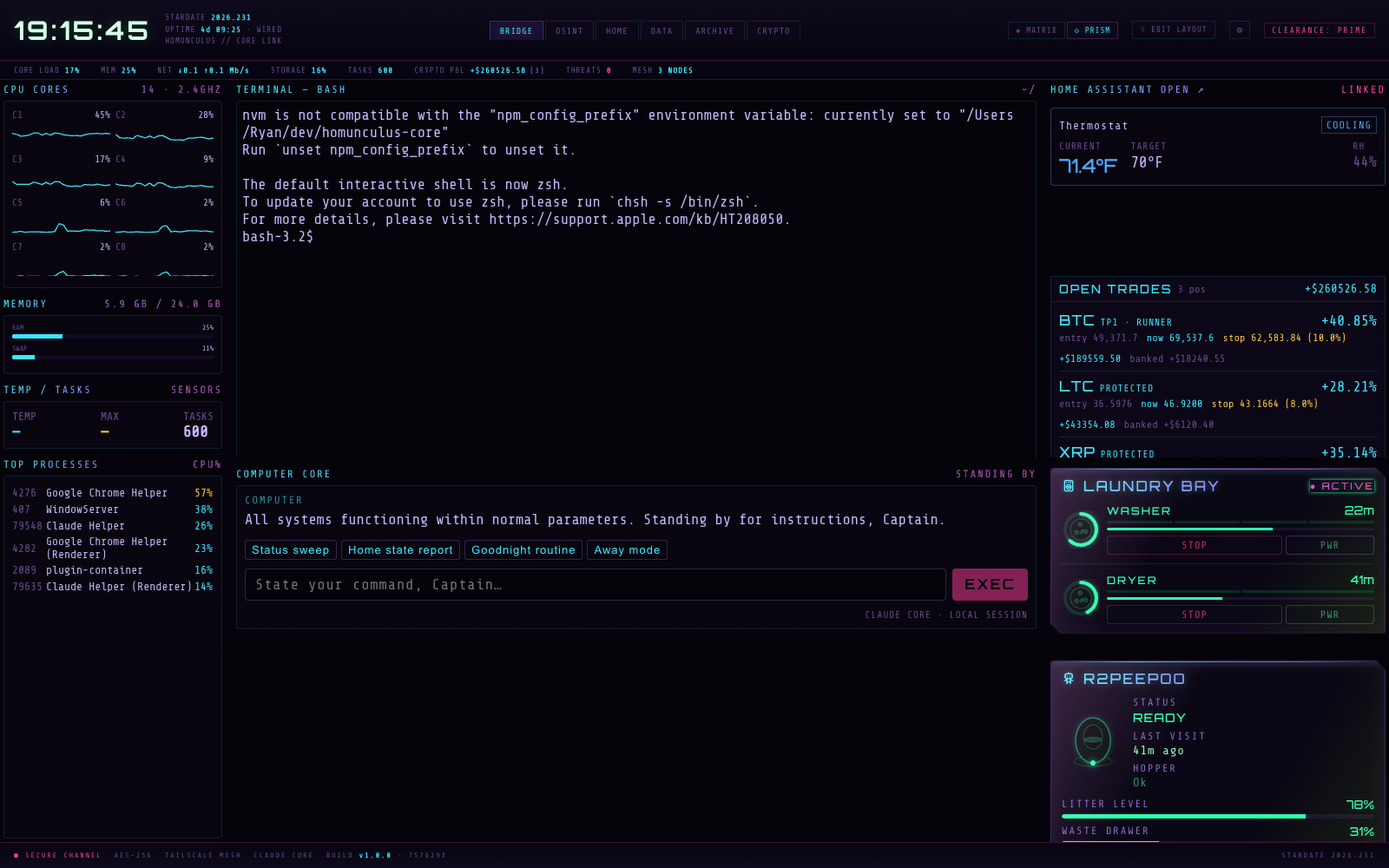
Computer Core
Streaming Claude chat over the Agent SDK, authenticated with your Claude subscription — no API billing. Three transcript roles: COMMAND, COMPUTER, and amber CORE ALERT bubbles pushed by the server's proactive watchers.
Status sweepHome state reportGoodnight routineAway modeEXECSystem Vitals
Per-core load with SVG sparklines, RAM + SWAP meters, CPU temperature with amber max flags, and a live top-processes table.
CPU CORES C0–C7RAM / SWAPTEMP · MAXTOP PROCESSESTerminal
A real shell — xterm.js in the panel, a genuine PTY on the server, streamed over WebSocket with resize and kill control. Not an emulation.
XTERM.JSNODE-PTY1000-LINE SCROLLBACKHolo tiles & widgets
Home Assistant climate cards with five interchangeable thermostat controls (radial, dual-handle range, overlay, inline, sheet), laundry, litter robot, cat colony, ambient weather, and read-only open trades with bracket phases.
THERMOSTAT ×5 VARIANTSLAUNDRYLITTER ROBOTCOLONYOPEN TRADES⌘K Uplink
Say it. Review it. Confirm it.
The headline AI surface: press ⌘K anywhere on the HOME tab and state an intent in plain language. Homunculus Core compiles the sentence into a numbered operation plan against a manifest of your actual devices — and shows you the plan before anything moves.
▸ "movie mode, but keep the reading lamp on and lock up"
Operation plan · 4 ops · compiled against manifest v12
scene.turn_onscene.movie_modeOKlight.turn_onlight.reading_lamp · {"brightness_pct": 40}OKlock.locklock.front_doorOKcover.close_covercover.garage_doorHELD — CONFIRM 04: CLOSE GARAGEREAD
State only. Any agent may look at anything, any time. Looking is always free.
WRITE
Routine and reversible — lights, scenes, media, climate. The agent may act alone; every act is logged to the archive and the audit chain.
CONFIRM
Unlocking doors, moving covers and garage doors — anything that can't be undone from a dashboard comes back HELD with a per-op confirm button. A human approves that specific operation, or it never runs.
The same endpoint serves autonomous agents — the palette is a window onto the exact interface the agents use, and execution re-validates every plan against the manifest rather than trusting a round-tripped one. Omission is the primary defence: a domain with no manifest entry has no actions at all, however the request is phrased.
Intelligence
Claude as crew, not chatbot
One model, many stations — every AI surface in Homunculus Core runs on your local Claude subscription through the Agent SDK. No per-token API billing, and a kill switch over every live session.
Computer Core
- Streaming ship's-computer persona on the BRIDGE
- Proactive voice-of-the-ship alerts pushed by server watchers
- Named house routines it can invoke —
goodnight,away - Model selectable per install — sonnet · opus · haiku
House agent
- ⌘K natural-language intents → manifest-validated plans
- Three-tier guardrails: read / write / confirm
- Stable
data-agent-idon every control - State spelled out in text, not just color
Trading fleet
- Hired agents with a mandate, a model, and an autonomy dial
- Per-agent and per-category USD ceilings
- Strategies authored as Claude skills with scoring ledgers
- Every action in the hash-chained audit log
Oversight
- RUNNING — every live session, one kill switch away
- Blockers ledger — who's stuck, on what, owed by whom
- Timeline swimlanes reconstructed from the audit log
- Token totals and compaction counts per desk
Architecture
Thin clients, one core
A hybrid client–server system — one Node backend, thin UIs everywhere. Desktop, phone, watch, and browser all render the same live state over WebSocket.
Frontend
- React 18 + TypeScript + Vite
- Transport-agnostic UI · Electron thin shell
- House-built 12-column drag/resize WidgetGrid
- Hand-rolled SVG charts · zero chart libraries
- CRT phosphor skin · 3 full themes
Backend
- One Node 20 process · HTTP + WebSocket on :8787
- Live telemetry multiplex · real PTY
- Cron watchers + disk persistence · optional Postgres
- Token-gated remote access · Dockerized
Intelligence
- Claude Agent SDK · local subscription auth
- Streaming persona chat · proactive alerts
- Skill-authored trade agents
- Deterministic Python screening engine
Reach
- Docker Desktop / WSL2 · Tailscale private mesh
- Phone · watch · browser · desktop
- No port-forwarding · data stays home
- ⇄ multi-node sync — newest edit wins, nothing deleted, keys never travel
Every tab body is a widget on a data-driven layout that persists server-side, so the desktop shell and the phone agree. Drag a widget's header to move it, its corner to resize, or drop it on another tab's chip to relocate it. 1,368 TypeScript tests and 174 Python engine tests keep it honest.
Security posture
Local by design
The bridge lives in the house, not the cloud. The Computer Core drives a logged-in subscription instead of a billed API, and the private data never touches an external service.
Secrets never travel back
- Keys live in the OS keychain, in memory on the server — never on disk in the clear
- The UI shows presence and a last-4 fingerprint, never plaintext
- Vault bridge disabled against remote backends — keys stay off the wire
Hardened surfaces
- Electron renderer sandbox · strict CSP, no inline scripts
- Origin gate on every API route — tokens alone never stopped a same-machine browser page
- Env allowlist for agent sessions — agents see only what they need
"Local" is not a trust boundary
- Audit routes demand the admin token even from localhost — agents run on this machine too
- Manifest-as-allowlist: an unlisted domain has no actions to call
- Operator and agent paths are deliberately different doors
Perimeter
- Remote requests refused without
HOMUNCULUS_TOKEN - Container binds
127.0.0.1only by default - Reached over a private Tailscale mesh — no ports on the internet
Setup
Three steps to the bridge
A first-run wizard configures only what you'll use — nothing is mandatory, and SKIP SETUP is always on the table.
Modules
Toggle the tabs you want — each card says needs n keys or no keys required. Tabs you turn off disappear from the bar; nothing is deleted.
Keys
Only the credentials your chosen modules need, as write-only fields with docs deep-links. Stored in your OS keychain, encrypted — Homunculus Core never shows a key again after you save it. Leave any blank and the module runs in reduced mode.
Launch
Star your default tab and ENTER HOMUNCULUS. A companion Home Assistant wizard (bash + PowerShell) detects your environment — Docker, HA OS, Pi, or an existing install — wires up HA_URL / HA_TOKEN, and never echoes the token.
Settings, any time
- TABS — reorder, rename, add custom tabs, set the launch tab
- WIDGETS — an inventory + catalog; move any panel to any tab
- KEYS — per-module status, write-only replace, env-var docs
- SYNC — tailnet node list, area checklist, ⇄ SYNC ALL NODES
Ships as
- Desktop app — dmg (macOS arm64 + x64), NSIS (Windows), AppImage (Linux)
- Docker container with optional bundled Postgres
- Any browser on the tailnet — phone and watch included
- The shell is honest: no backend → a self-contained waiting page that auto-connects